
🖨️ Step-by-step guide

Brim Ears
for Clickers

Target bed adhesion exactly where it's needed — no full brim, no cleanup mess.

Step 1 – Process Panel Step 2 – Set Brim Type Step 3 – Brim Ears Tool Step 4 – Generate Ears Step 5 – Slice & Preview
💡 Why Brim Ears?

Targeted Bed Adhesion for Small Parts

Clicker caps have a very thin and small footprint — the narrow base that touches the print bed. Without good adhesion, edges lift during printing and the cap warps or fails entirely.

Brim Ears add brim exactly where you need it — around the cap base — without covering the entire plate. Less cleanup, better results.

✅ Works with 🟢 Bambu Lab Studio 🟠 Orca Slicer 🔵 Anycubic Slicer Next
1

Open the Process panel → Others tab

Open your model in Bambu Studio. In the Process panel, make sure you're in Global mode — then click the Others tab.
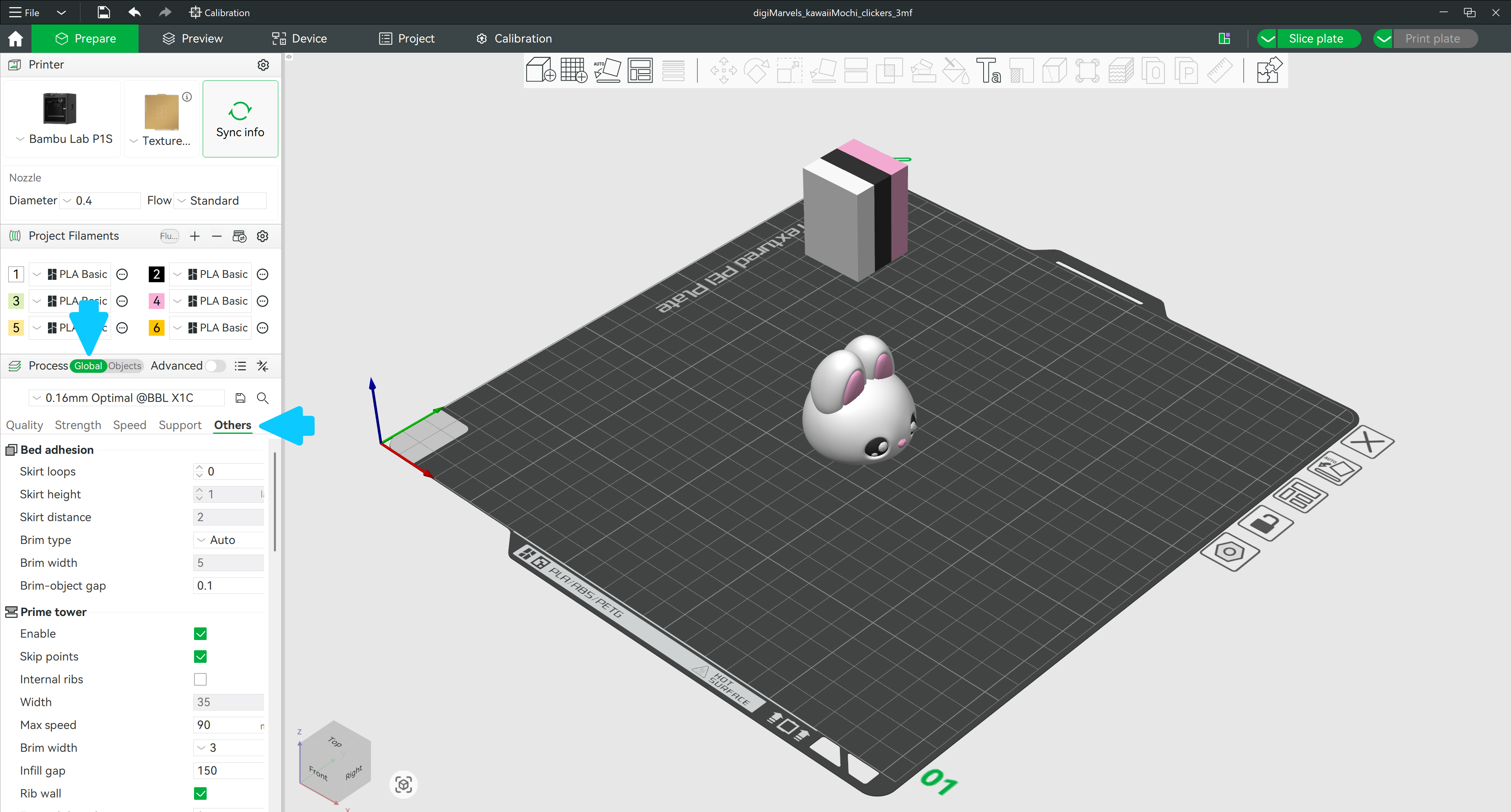
Global mode Others tab in Bambu Studio
Click to enlarge
2

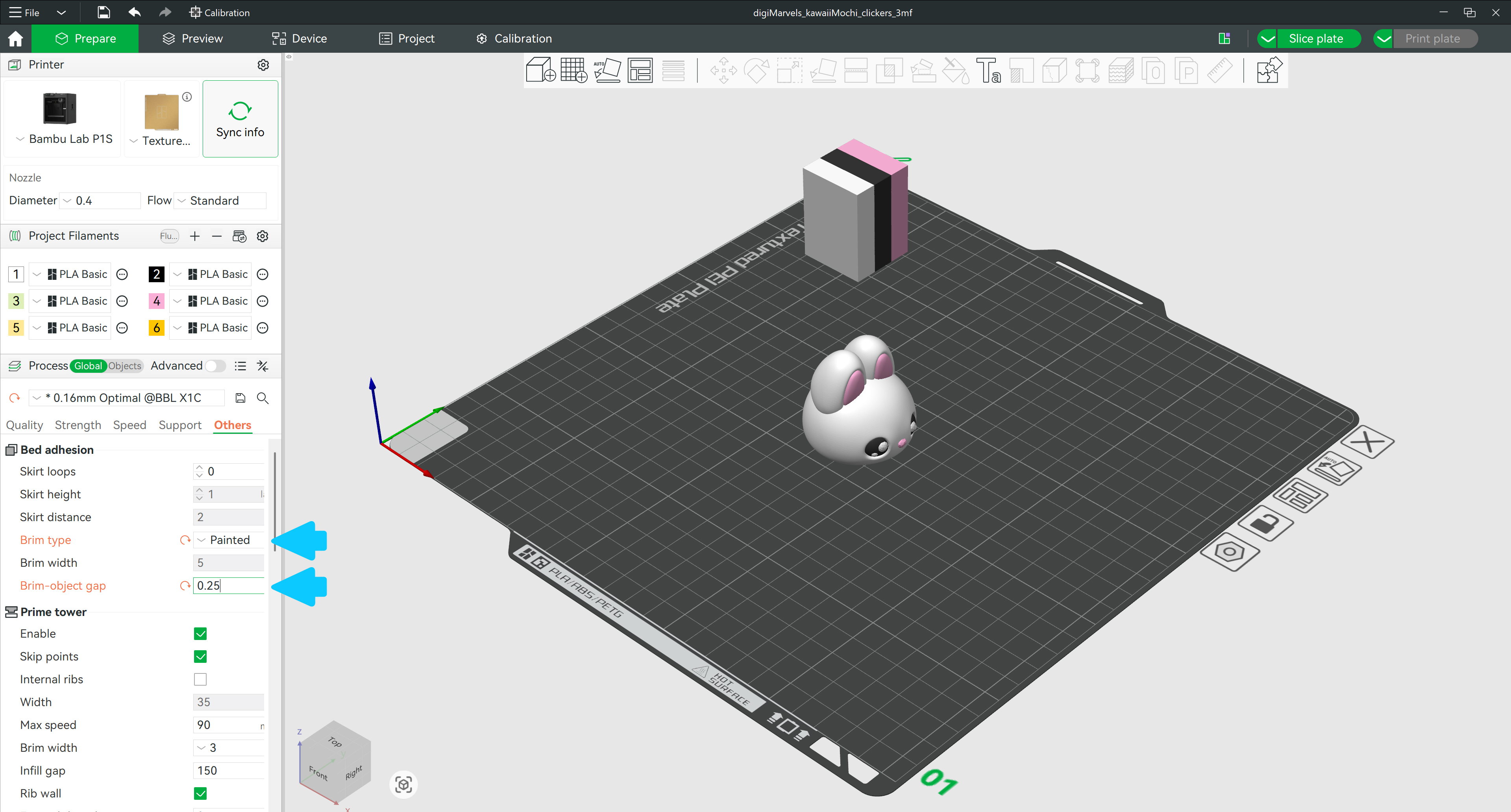
Set Brim Type to Painted & adjust the gap

Bed Adhesion settings — Brim Type Painted and gap 0.1 mm
Click to enlarge

Under Bed Adhesion, set Brim Type to Painted. Then set Brim–object gap to 0.1 mm — the bigger the gap, the easier the brim is to peel off after printing.

🟠 Orca / 🔵 Anycubic: Use Mouse Ear brim type. Set the Brim Width setting to match the cap's inner hole size — then jump directly to slicing.
💡 Tip: Start with 0.1 mm. Increase the gap if the brim is hard to peel off — decrease it if the part is still lifting. You can also try increasing the bed temperature by 5°C for better adhesion.
3

Select the model & open the Brim Ears tool

Click the model to select it. Then open the Brim Ears tool from the top toolbar — or just press E on your keyboard.
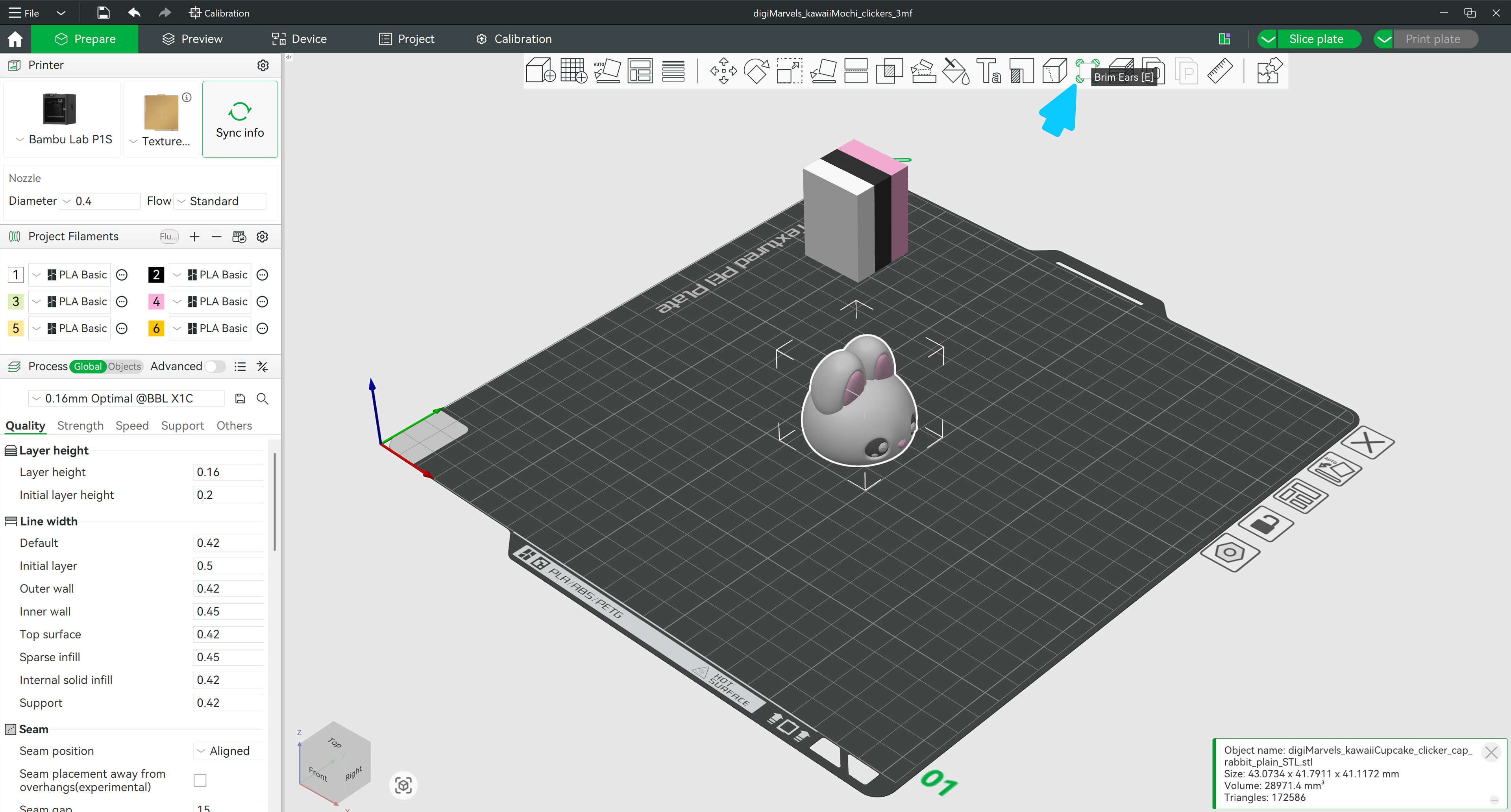
Selecting the Brim Ears tool from the top toolbar
Click to enlarge
4

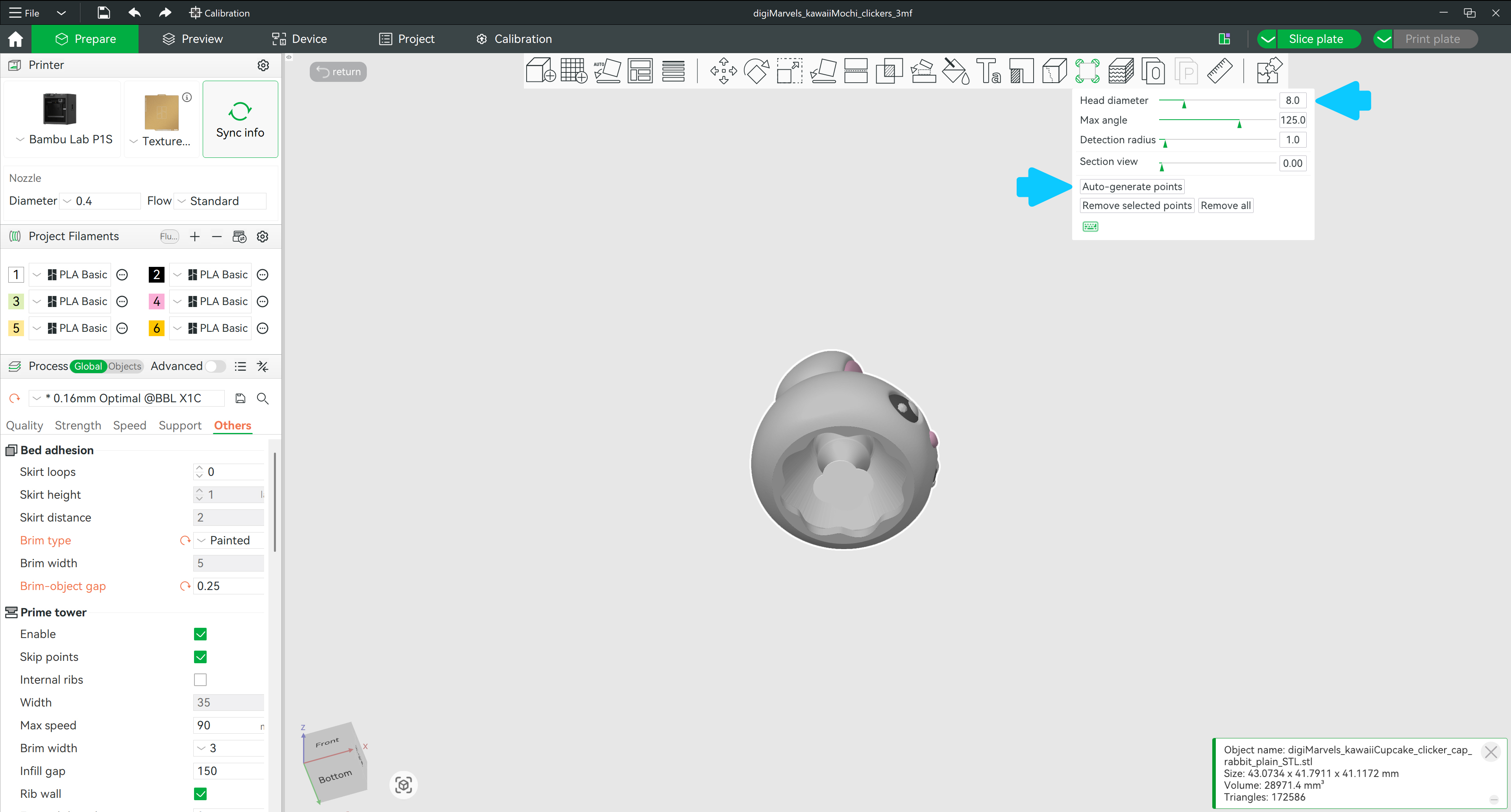
Auto-generate brim ears on the base

Painting enforce brim around cap base
Click to enlarge

Rotate the model to see the bottom. Choose the Head diameter (use maximum if the cap has a thin base) — then click Auto-generate points. The tool will place brim ears around the base automatically.

💡 Tip: Rotate with Left Mouse + drag to get a clear view of the base first.
💡 No points generated? You can place them manually — just Left Click directly on the model base while the Brim Ears tool is still active. Each click adds a point exactly where you need it.

Preview & Slice

Click Slice and switch to the Preview tab. You'll see the brim appear only around the outer edges of the base — right where the ears were placed.

💡 After printing: Peel the brim off from both the outer and inner edges of the cap base — it should come away cleanly. A flat tool helps if it's well-adhered to the bed.
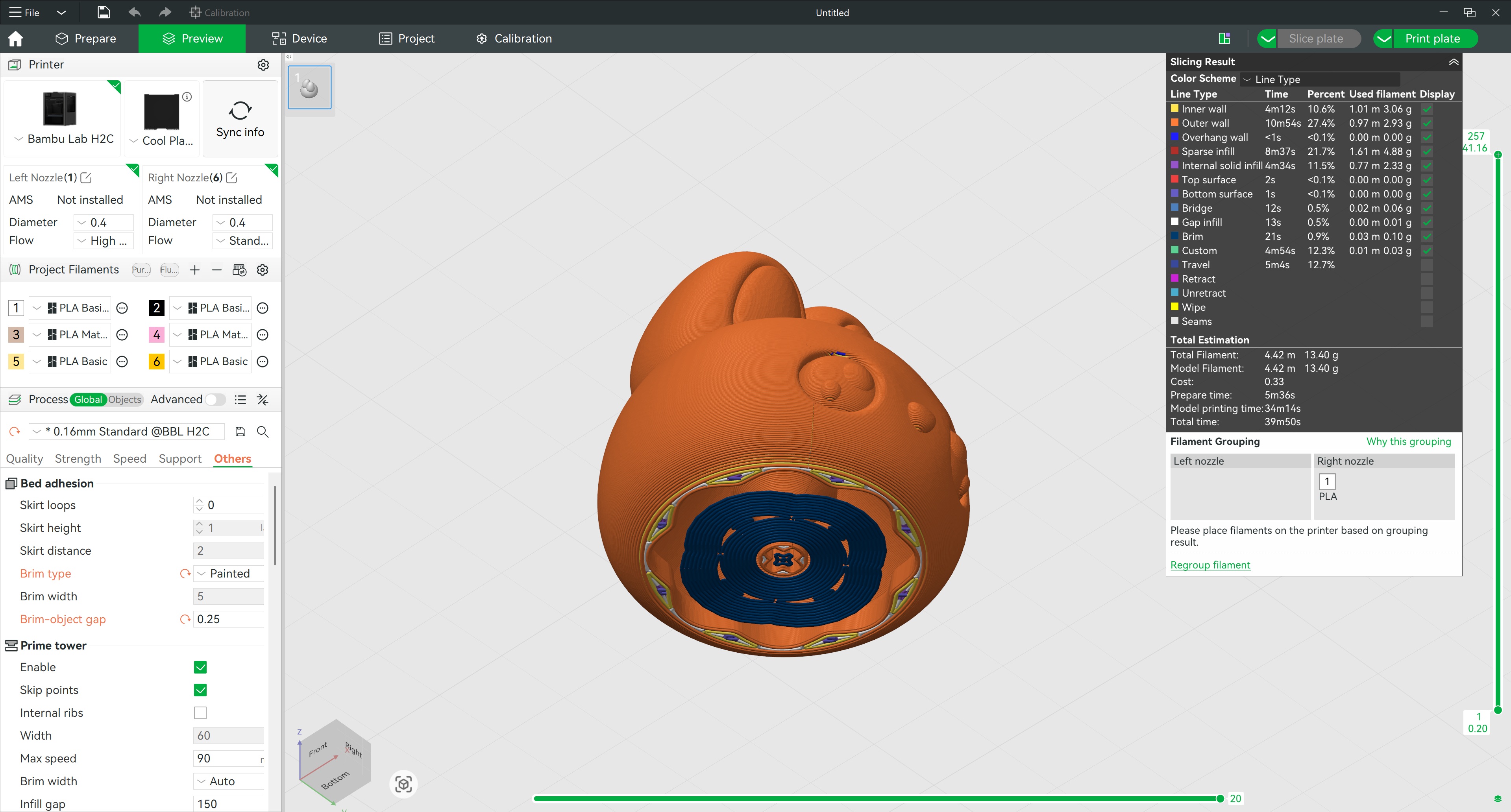
Sliced preview showing painted brim on cap
Click to enlarge

Frequently Asked Questions

What are Brim Ears in 3D printing?+
Brim Ears are small disc-shaped extensions added only at the corners or edges of a model's base — instead of a full brim around the entire perimeter. They improve bed adhesion exactly where it's needed most, at sharp corners prone to lifting, without adding excess material across the whole plate.
Why is my 3D printed clicker cap lifting off the bed?+
Clicker caps have a thin, small footprint which makes them prone to lifting during printing. The small contact area means less adhesion force at the edges. Using Brim Ears in Bambu Studio adds targeted adhesion at the base corners and prevents them from curling up.
Should I use a full brim or Brim Ears for small parts?+
Brim Ears are usually better for small parts like clicker caps. A full brim adds material around the entire model including inside holes, which is harder to remove cleanly. Brim Ears target only the corners where lifting actually occurs, making removal much easier.
How do I add Brim Ears in Bambu Studio?+
Set Brim Type to Painted in the Process panel under Bed Adhesion. Select your model and press E (or click the Brim Ears tool in the toolbar). Use Auto-generate points to place ears automatically, or click on the base to add them manually. Slice to see the result in the Preview tab.
Are Brim Ears easy to remove after printing?+
Yes — especially with a small brim-object gap (0.1 mm is a good starting point). The gap creates a slight separation between the ear and the model wall so it peels off cleanly. Increase the gap if removal is difficult, decrease it if the part is still lifting.
How do I prevent small 3D prints from warping?+
Use Brim Ears to improve adhesion at corners, ensure your bed is clean and leveled, and set a small brim-object gap. If corners still lift, try increasing the bed temperature by 5°C. Slowing down the first layer speed also helps significantly.