
🦝 Print-in-Place Guide

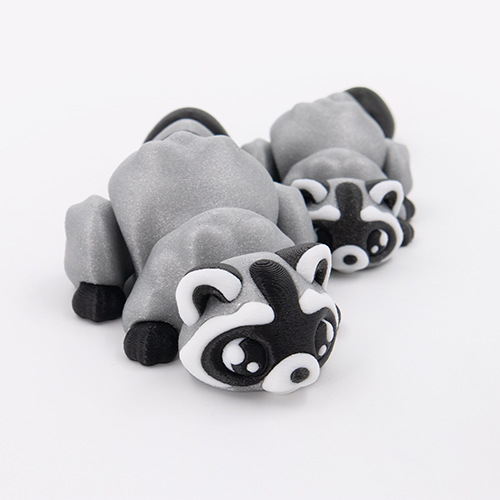
Cozy Raccoon Flexi
Printing Tips

Everything you need to print your articulated kawaii raccoon.

Cozy Raccoon Flexi – kawaii articulated raccoon 3D print by DigiMarvels
View on Patreon →
📦 What's Included ⚙️ Settings 🎨 Filaments ✏️ Customize 🔗 Useful Links
🎉 No assembly needed! The raccoon is fully print-in-place. It wiggles straight off the bed.
🦝
Raccoon Flexi 2 STL FILES
Both come as keychains. Remove the keyring by splitting parts in your slicer, or use the 3MF file.
🦝 Calm 😤 Grumpy
📦
3MF File 1 FILE ⤢ preview
4 color presets, parts pre-separated. Open and slice. Lets you remove optional parts (eye glares, pupils, front paw sleeves).
⚙️

Printing Settings

Layer
0.16 mm
Infill
20% — Gyroid
Walls
2 Loops
Material
Basic PLA
Supports
None Needed
Scale
Tested down to 60%
Fuzzy Skin (optional)
Contour Point dist 0.15 mm  ·  Thickness 0.1 mm
💡 Gives a nice fur texture on the body. Set Seam → Random to hide the seam line.
🎨

Filaments Used

Bambu Lab Galaxy PLA
Brown Black
Spectrum Glitter PLA
Volcano Grey Silver
Bambu Lab Basic PLA
Black
Ziro Fast Gradient Matte PLA
Sunlight Petal
✨ Want a shinier finish? tap to expand
Drop your outer wall speed to 60 mm/s or below. Slower speeds let the surface settle for a smoother finish.
📦
Open the 3MF file
4 color presets, parts pre-separated and ready to slice. Recommended over the STL.
🦝
Choose your raccoon
Calm for a cozy desk companion. Grumpy for everyone who gets it.
🎨
Recolor a part
Alt + Left Click the part, then press 1 2 3 … on your keyboard
Or select from the filament list in Object Mode.
🗑️
Remove optional parts
Alt + Left Click the part → press Delete
Works for: eye glares, pupils, front paw sleeves.
📐
Fine-tune optional parts
Alt + Left Click the part → press S to scale
Works for: pupils, eye glares, nose.
Avoid Fill Paint on most parts. It can leave messy color edges. Exception: the raccoon's bottom repaints well with Fill Paint using Edge Detection + Smart Fill Angle 20°.
Happy Printing! 🦝