
🐡 Quick Reference Guide

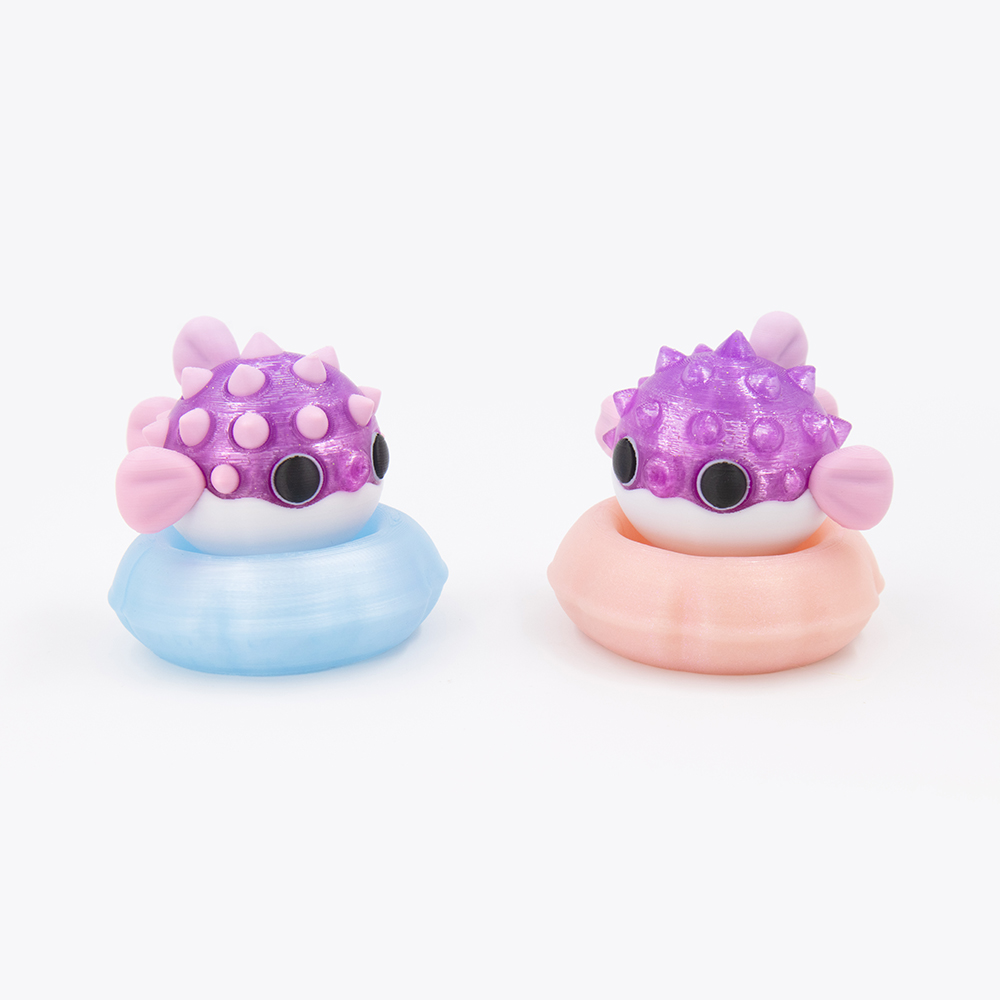
Pufferfish Clicker
Printing Tips

Everything you need to print and assemble your Pufferfish Clicker fidget toy.

Pufferfish Clicker – kawaii fidget clicker 3D print by DigiMarvels
View on Patreon →
📦 What's Included ⚙️ Settings 🎨 Filaments ✏️ Customize 🔗 Useful Links
📁

Files, Switch & Assembly

💡 New to printing fidget clickers? This clicker is made of 2 parts — pick your Base and your Cap, then print, insert a keyboard switch, and click!
⌨️ Keyboard switch required tap to expand
You'll need a mechanical keyboard switch — it's what creates the click.
Tested switches: Kailh BOX White (crisp, loud), BOX Jade (crunchier, louder), BOX Brown (quiet).
Pufferfish Base — 2 STL files · ring-shaped floaty coaster · holds the keyboard switch
🛟 Base 🛟 Multicolor Base
Caps — 4 STL files · pufferfish body · presses onto the switch stem · round spots or spiked spots · both available as keychains
🐠 Round Spots Cap 🔑 Round Spots Cap Keychain 🐡 Spiked Spots Cap 🔑 Spiked Spots Cap Keychain
1 3MF File — all parts pre-arranged with color assignments  ▾ preview
🐡 Assembly steps tap to expand
1. Add one drop of super glue into the switch hole inside the Pufferfish Base
2. Insert the switch into the Base, aligning the pins to the holes
3. Add one drop of super glue on top of the keyboard switch stem
4. Press the Cap firmly onto the switch stem
⚙️

Printing Settings

Layer
0.16 mm
Infill
15% — Gyroid
Walls
2 Loops
Material
Basic PLA
Supports
Manual ▾ preview ?
The Cap (fish body) requires manual supports for the side fins, back fin and switch stem hole. Support for PLA filament is recommended but not required — it just makes removal easier and the prints come out a bit cleaner 🩷
Brims
Not required
🔧 Setting up manual supports tap to expand
Place supports manually on the side and back fins and on the switch stem hole.  ▾ preview
Type
Tree (manual)
Style
Tree Strong
Support Interface
Support PLA filament ▾ preview
Top Interface Layers
3–4
🪲 Part lifting off the bed? tap to expand
Add Brim Ears to the part and/or increase the bed temperature by 5+ °C.
🎨

Filaments Used

Bambu Lab Basic PLA
Beige White Black
Cookiecad Elixir PLA
Pale Pink Solar Flare Unicorn
Polymaker Panchroma Celestial PLA
Pink Blue
Bambu Lab Galaxy PLA
Brown
Polymaker PolyTerra PLA
Banana Yellow
Ziro Fast Gradient Matte PLA
Drift Feather
Ziro Gradient Twinkling PLA
Lavender
Bambu Lab Silk Dual PLA
Gilded Rose
✨ Want a shinier finish? tap to expand
Decrease your outer wall printing speed to 60 mm/s or below — slower speeds give the surface more time to settle smoothly.
🎨

Editing Colors & Parts

⚠️ Do not scale the model — clickers are not suitable for scaling. It will break the fit between parts and the switch won't seat correctly.
  • Open the 3MF file — parts are pre-separated with suggested color assignments
  • To recolor a part: Alt + Left Click → press the filament slot number (1, 2, 3…) — or select it from the filament list in Object Mode
  • To remove optional parts (spots, pupils, eye glares): Alt + Left Click the part → press Delete
Don't use the Fill Paint tool to repaint parts — it can cause messy color edges. Use color assignments instead.

👉 Full 3MF guide →
Happy Printing! 🐡